Showing posts with label gaming. Show all posts

Tuesday, 17 January 2017

Gaming Controllers

Top 10 Gaming Controllers for PC
A game controller is a device used with games or entertainment systems to provide input to a video game, typically to control an object or character in the game. A controller is usually connected to a game console or computer by means of a wire or cord, although, since the mid-2000s, wireless controllers have become widespread. Input devices that have been classified as game controllers include keyboards, mouses, gamepads, joysticks, etc. Special purpose devices, such as steering wheels for driving games and light guns for shooting games, are also game controllers.
Game controllers have been designed and improved over the years to be as user friendly as possible. The Microsoft Xbox controller, with its shoulder triggers that mimic actual triggers such as those found on guns, has become popular for shooting games. Some controllers are designed to be deliberately best for one type of game, such as steering wheels for driving games, or dance pads for dancing games.
One of the first video game controllers was a simple dial and single button, used to control the game Tennis for Two. Controllers have since evolved to include directional pads, multiple buttons, analog sticks, joysticks, motion detection, touch screens and a plethora of other features. Let’s take a look on the list of top 10 Gaming Controllers for PC in 2016:

1. Xbox 360 Wireless Controller
Price: $31.40+ $18.50(wireless receiver for pc) [amazon.com]

The Xbox 360 Wireless Controller borrows many design elements from the Controller S. The left and right analog sticks and triggers, the control pad, and the face buttons are all in the same spots, constructed rather similarly. The start and Back buttons have been moved to the center, flanking the new guide button, which can turn on the system remotely and allows access to your gamer card at any time. Removed from the older controller are the black and white buttons, which were awkwardly placed below the face buttons. Taking their place are the left and right bumpers, which make their home on the top of the controller in front of the triggers. Atop the controller is a small white sync button that, for the first time, allows your controller to communicate with an Xbox 360 console. The slight changes have resulted in a nearly perfect design; not only is the controller great for Xbox 360 games, but you may just prefer the new layout for the backward-compatible Xbox1 titles, as the bumpers are better located than the black and white buttons.
A variety of inputs are unobtrusively located on the Xbox 360 Wireless Controller. On the top is the input for the Xbox 360 Play and Charge Kit, which allows you to recharge the battery pack via a cabled USB connection to the console--though we found the Quick Charge Kit to be a far better solution. On the bottom is a headset input. You can plug in any headset with a 2.5mm minijack (standard for cell phone headsets), but the input is form-fitted to accept the Xbox 360 Headset, which has built-in volume and mute buttons. Compared to the wired controller, this model is slightly heavier and bulkier, due to the presence of the battery pack at the back of the controller.

As for performance, it's phenomenal, besting even Logitech and Nintendo's wireless wares. Response time is even with that of any wireless controller released before. The controller is as responsive as its wired counterpart, with the exception of the guide button, which takes a few seconds longer to sync wirelessly. The force feedback is strong but not quite as strong as the wired controller's. That said, where the 360 Wireless Controller separates itself from the rest of the pack is its ability to connect multiple controllers at once. While other controllers require multiple dongles and manually chosen frequencies, each of these wireless controllers will sync with the Xbox 360 console once the guide button is pressed. Once connected, the quadrant of the guide button corresponding to the player's number lights up.

2. SteelSeries Stratus XL
Price: $53.99 [amazon.com]

SteelSeries is a company largely known for its gaming mice and keyboards. Last year, it jumped into the mobile gaming market with the introduction of the Stratus and the full-sized Stratus XL for iOS some months later. More recently, the company released a new version of the Stratus XL controller for use with Android and Windows PC. Given that PC gamers have no shortage of controllers to choose from, SteelSeries was entering a tough market already dominated by the standard Xbox 360 controller.
The Stratus XL feels well-made, with a matte black surface. It runs on two AA batteries and is slightly heavier than a DualShock 4, but not so much so that it feels uncomfortable to hold. Despite the "XL" in the name, it's around the same size as the DualShock 4, so you won't need extra-large hands to use it.The concave analog sticks are stiffer than the DualShock 4, which makes precision aiming in first person shooters harder as a result. The analog sticks are slightly closer together, but there's no perceptible difference in how it feels beyond its stiffness.
The charge on the controller lasts a long time, even on standard disposable AA batteries. I was able to play Fallout 4 and Assassin's Creed Syndicate for a week (for many hours at a time) without having to swap out the batteries. The battery life lives up to the box specifications' claim of delivering an estimated 40 hours of playtime.
To conserve battery charge, the controller shuts off on its own when you're not in a game. You can also turn it off manually with a switch located at the back. Though not as effective as having a warning pop-up on screen, the orange LED indicator on the controller tells you how much power you have left.

3. Razer Wildcat
Price: $99.99 [amazon.com]

Razer offers its own elite Xbox One PC gamepad in the form of the Wildcat. It feels good in the hand and is very responsive, and you can customize it much like the Elite controller. However, it's strictly a wired gamepad, and for the same price tag you, can get the first-party Elite controller and have the option to cut the cord whenever you want. If the Wildcat cost half as much as the Elite, it would be a viable, premium wired gamepad to consider, but as it stands it simply doesn't justify its price.
The boldly styled Wildcat looks and feels like an overbuilt Xbox One controller. Its layout and the general build quality of its matte black plastic body are nearly identical to the Xbox One gamepad, with all of the standard controls feeling indistinguishable from the stock controller's buttons and sticks. The direction pad is a four-segment cluster closer to that of a DualShock 4, but otherwise everything else feels the same. A pair of sliding trigger lock switches sit under the top set of alternate triggers. They limit the pull distance of the standard triggers, just like the trigger locks on the Xbox Elite Wireless Controller.
Razer added some extras in addition to the standard controls. A built-in wired headset adapter sticks out of the bottom of the gamepad between the hand grips, and is laid out exactly like a standard Xbox One Stereo Headset Adapter. This is a nice touch, and one the Elite controller lacks.
Two additional pairs of triggers sit on the underside of the Wildcat, similar in purpose to the removable paddles on the Xbox Elite Wireless Controller. They're smooth, glossy black plastic rather than metal, and feel more natural to reach with your fingers. One pair sits between the grips, comfortably resting under your middle fingers while your index fingers hold the standard triggers. The other, more bumper-like pair, sits between the standard triggers and can be accessed by stretching your index fingers slightly further around the gamepad.
You can remove the multifunction triggers on the underside of the Wildcat with the included screwdriver, if you wish. Once they're out, a pair of small covers flip down over the mounting holes and lock in place. If you want to put the triggers back, two small switches next to the covers release them. You can't remove the multifunction bumpers higher on the gamepad.

4. Logitech Gamepad F310
Price: $19.96 [amazon.com]

The Logitech F310 gamepad has a sturdy design and is compatible with nearly any PC game. It is missing vibration feedback, which may be a deal breaker for some, but its dual-analog joysticks and pressure-sensitive triggers make it a great choice for many games.
Because the Logitech 310 lacks vibration feedback, you will miss the tactile cues some games use. For example, if an enemy is shooting you with silent rounds, you might not notice it as quickly without the vibration warning. If you don't want to lose touch feedback, this controller isn't for you.
One feature we really enjoyed is the profiler software. Not all PC games come with the needed support to handle a gamepad. With the Logitech F310 you don't have to worry about that since the profiler software allows you to customize the various buttons and eliminate the need to coordinate a keyboard and mouse. We also found the multiple input modes useful.
It comes with both XInput and DirectInput modes. Older games tend to use DirectInput while newer games use XInput. The primary reason for this difference in input modes is the shift in gaming that took place when the Xbox 360 launched. The 360's controller uses XInput, and many game developers switched to the newer, easier controller setup. However, if you have older games, it's good to know that the F310 will work with those games as well.

5. Xbox One Elite Wireless Controller
Price: $134.00 [amazon.com]

The Xbox Elite Wireless Controller came as surprise when it was first announced. Both its price and its purpose seemed misaligned with the image Microsoft wanted to put out there after the Xbox One's slow start out of the gate.
It's expensive, extravagant and perhaps most useful for only a small niche of the Xbox community i.e. it's everything Microsoft was trying to avoid when it rebranded the Xbox One from a next-level gaming machine on par with PCs to the more affordable, all-in-one entertainment center we see today.
But despite what the lavish, pro-only price suggests, the controller has a universal appeal that anyone - from the tier-one Call of Duty players to the casual Peggle kings - can enjoy.
Why? The Xbox Elite Wireless Controller is easily the most comfortable controllers on the market, with rubberized grips, a cool-to-the-touch finish and stainless steel components that can be swapped out to suit your needs.
Add to that a slew of paddles located on the back of the controller that can be assigned the function of any face button and a set of reinforced hair triggers that can be programmed and physically set to different sensitivity levels and you have the makings of a great gamepad.
Best of all, it works on PCs running Windows 7 or higher - including, of course, Windows 10. Drivers for PC release on October 27 which, unsurprisingly, coincide nicely with the recent release of the Xbox One Controller Wireless Adapter.

6. NVIDIA SHIELD wireless controller
Price:  $59.99 [amazon.com]

If the Nvidia Shield already sounds like a familiar name, that's because it is. Nvidia has used the Shield moniker a couple times before, with its Shield Portable and Shield Tablet.But the Shield console is different from its predecessors, both in its form factor - obviously - but more importantly in its intentions.
This is the world's first-ever 4K Android TV set-top box, and the first widely offered streaming device that's capable of handling Ultra HD. That means, unlike the Roku 3, Chromecast or even Amazon Fire TV, you can actually connect this to a 4K TV in your home, throw on Netflix, HBO Now or YouTube, and be treated to stunning 3,840 x 2,160 resolution content.
Where the Shield Portable failed to capture the Nintendo 3DS's spot in our pockets and the Shield Tablet a spot in our bags, the Nvidia Shield is attempting in earnest to claim a space beneath our TVs.
 The Shield is exactly what you've been waiting for.But maybe you can't see yourself enjoying gaming on a micro-console with a limited library of PC-quality games, or you've decided that you're not ready for 4K yet (or more likely it's not ready for you). In either case, then you should probably save yourself some cash and buy one of the half-dozen other equally good, if not a hair more complete, set-top boxes.

7. Mad Catz L.Y.N.X. 9
Price: $99.99 [amazon.com]

Mad Catz has always done things a little differently. The Rat gaming mouse looked like nothing before it when first launched 5 years ago, but has proven its staying power with a new version, the Rat Pro X.
PC and console gaming is all well and good, but those markets aren’t growing; they’re flatlining. Mobile gaming on the other hand is going from strength to strength and it’s more than just casual gaming that’s fuelling the growth. Games such as BioShock and FIFA look and play great on phones and tablets – that is, if you have the right controller.
So it’s not quite such a surprise that Mad Catz has announced an incredible new mobile controller for those wanting the very best experience across mobile, tablet and even smart TVs. It’s called the Mad Catz L.Y.N.X. 9 and it’s part Swiss Army knife, part transformer, part Lego Technic and entirely bonkers. But bonkers in a good way.
The Mad Catz L.Y.N.X. 9 attempts to combat this by folding into a smart little package. We’ve seen this sort of thing before on the likes of the Phonejoy gamepad, which is a nifty little mobile controller, but the L.Y.N.X. 9 is on another level entirely.
It consists of three core components – a ‘left wing’, a ‘right wing’ and the controller’s ‘brain’ – which can be rearranged to work with a phone or joined to the included tablet stand. This can accommodate tablets with screen sizes of up to 7 inches.
Connect the L.Y.N.X. 9 to a Smart TV or desktop PC and you get a controller that runs rings around remote controls. Aside from the keyboard the Mad Catz L.Y.N.X. 9 includes a mouse control sensor near the top of the controller, with left and right mouse buttons. It takes a little getting used to, but works well, floating the cursor around just like the pointer stick on a Lenovo ThinkPad does. Still not enough inputs for you? Well you could always just keep the right thumbstick pressed to activate the microphone. Yes, that’s right, the L.Y.N.X. 9 comes with a mic built into it, too.

8. Thrustmaster GPX LightBack 
Price: $49.49 [amazon.com]

Thrustmaster also sent us their GPX Lightback Ferrari F1 Edition. The controls are in many ways comparable to those of the standard GPX. This gamepad does offer a number of extras. Grip is clearly improved by the additional rubber coating on the bottom, and the plastic on the top feels more luxurious. Numerous Ferrari decorations are also present.
Additionally, we find four leds for both triggers on top of the controller which act as speed indicators. Also, red lighting has been incorporated into the ball of the thumbsticks. This lighting is visible when the vibration in the gamepad is activated. You probably won't be seeing much of this while gaming, as you'll naturally be too busy focusing on other things.
You don't have to spend that much money to be able to purchase a rather sterling gamepad for use with the computer. Most of the gamepads we tested can additionally also be used in combination with the Xbox 360. If you find yourself unable to spend a lot of money on a gamepad, then both the Thrustmaster GPX and the Xbox 360 controller are good choices. The Thrustmaster has better vibration, whereas the Xbox 360 controller in general features slightly smoother controls. The Thrustmaster GPX Lightback Ferrari F1 Edition is a little more expensive, clearly has a better grip, and feels more luxurious.
If you already have a Playstation 4, then you won't have to search for a good gamepad for the computer. The Sony Dual Shock 4 Controller can also be used quite well for this purpose. The vibration function feels the most powerful, and the triggers and thumbsticks are very pleasant to use. All round this is the best gamepad, and as such, it'll take home a Hardware.Info Gold Award. The Hardware.Info Silver Award goes to the Thrustmaster GPX Lightback Ferrari F1 Edition and the Hardware.Info Bronze Award is for the Microsoft Xbox 360 Controller and the vanilla edition of the Thrustmaster GPX.

9. Steam Controller
Price: $49.89 [amazon.com]

The Steam Controller brimmed with potential when it first came out. The atypical touchpad setup and customisation options made the Xbox and PlayStation’s gaming pads look like archaic children’s toys last year.
The touchpads’ tweakable sensitivity also promised to offer mouse and keyboard precision on a gamepad – something console gamers moving to PC have longed for, for quite some time.
But what really set it apart was its loadout system. The Steam Controller lets you customise what each button and axis does on a game-by-game basis. You can then share any control scheme you make with the Steam community. This should have made it easy to find decent control schemes for most games, even if the developer didn’t bespoke create a Steam Controller setup.
Steam’s owner, Valve, has taken its time entering the hardware scene. It’s been two years since SteamOS was announced, and almost as long since we got a first glimpse of the Steam Controller. And we’ve yet to see any living-room boxes on shelves.
That’s set to change next month with a raft of Steam Machines hitting the market, but in the meantime Steam has released two peripherals: the Steam Controller and the Steam Link. The latter lets you play games on your TV via your gaming rig, but it’s the controller – with its haptic pads – I’ll be looking at in more detail here.
It’s an interesting product, no doubt. It attempts to bridge the gap between PC and console gaming, aiming to be the gamepad that's a jack-of-all-trades. But it risks being seen a master of none and a tepid living room replacement for the mouse and keyboard.

10. Microsoft Xbox 360 Wired Controller
Price: $26.99 [amazon.com]

The Xbox 360 Controller borrows many design elements from the Controller S. The left and right analog sticks and triggers, the control pad, and the face buttons are in the same spots, constructed rather similarly. The start and Back buttons have been moved to the center, flanking the new guide button, which allows access to your gamer card at any time. Removed from the older controller are the black and white buttons, which were awkwardly placed below the face buttons. Taking their place are the left and right bumpers, which make their home on the top of the controller in front of the triggers. The slight changes have resulted in a nearly perfect design; not only is the controller great for 360 games, but you may just prefer the new layout for the backward-compatible Xbox1 titles, as the bumpers are better located than the black and white buttons.
On the bottom of the controller is a headset input. You can plug in any headset with a 2.5mm jack (standard for cell phone headsets), but the input is form-fitted to accept the Xbox 360 Headset, which has built-in volume and mute buttons. Compared to the wireless controller, this model is slightly lighter and less bulky due to the absence of a battery pack at the back of the controller.
The performance of the Xbox 360 Controller on the console is phenomenal, with instantaneous response time. The controller syncs with the system much faster than the wireless controller, and the force feedback is a bit stronger. On the PC, the controller performs more than admirably. Once you download the software from Microsoft's official site, the controller will work with any controller-compatible game. As long as the game you're playing allows you to customize button usage (most do), the controller ranks among the best available for the PC. Games specifically designed to work with the controller can also make use of the headset input and the force feedback.

The Xbox 360 Controller is one of the best-designed and best-performing controllers on the market. If you're looking for faults, you might argue the controller lacks any startling new features--especially in comparison to the motion-based controllers for the upcoming Nintendo Wii and Sony PlayStation 3--which may hinder true game design innovations. And you might also say the controller's about $10 too expensive. Overpriced or not, however, it serves as a great third (or fourth) Xbox 360 controller and, when called upon, fills in nicely as a PC gaming controller.

Tuesday, 27 December 2016

Mobile Games

Top 10 Mobile Games in 2016

History of Mobile Games:
A mobile game is a video game played on a feature phone, smartphone, smartwatch, PDA, tablet computer, portable media player or calculator.
The earliest known game on a mobile phone was a Tetris variant on the Hagenuk MT-2000 device from 1994.
In 1997, Nokia launched the very successful Snake. Snake (and its variants), that was preinstalled in most mobile devices manufactured by Nokia, has since become one of the most played video games and is found on more than 350 million devices worldwide. A variant of the Snake game for the Nokia 6110, using the infrared port, was also the first two-player game for mobile phones.
Today, mobile games are usually downloaded from app stores as well as from mobile operator's portals, but in some cases are also preloaded in the handheld devices by the OEM or by the mobile operator when purchased, via infrared connection, Bluetooth, memory card or side loaded onto the handset with a cable.
Downloadable mobile games were first commercialised in Japan circa the launch of NTT DoCoMo's I-mode platform in 1999, and by the early 2000s were available through a variety of platforms throughout Asia, Europe, North America and ultimately most territories where modern carrier networks and handsets were available by the mid-2000s. However, mobile games distributed by mobile operators and third party portals (channels initially developed to monetise downloadable ringtones, wallpapers and other small pieces of content using premium SMS or direct carrier charges as a billing mechanism) remained a marginal form of gaming until Apple's iOS App Store was launched in 2008. As the first mobile content marketplace operated directly by a mobile platform holder, the App Store significantly changed the consumer behaviour and quickly broadened the market for mobile games, as almost every smartphone owner started to download mobile apps.
Here is the List of Top 10 Mobile Games in 2016:
1. Pokémon Go
(Google Play: 4/5, iTunes- Apple: 3/5)

Pokémon Go is a free-to-play, location-based augmented reality game developed by Niantic for iOS, Android, and Apple Watch devices. The game was the result of a collaboration between Niantic and Nintendo, by way of The Pokémon Company, and was initially released in selected countries in July 2016. In the game, players use a mobile device's GPS capability to locate, capture, battle, and train virtual creatures, called Pokémon, who appear on the screen as if they were in the same real-world location as the player. The game supports in-app purchases for additional in-game items.
Pokémon Go was released to mixed reviews, with critics praising the game's concept and the incentive to be more active in the real world, while criticizing frequent technical issues apparent at launch. Despite such reviews, it quickly became a global phenomenon and was one of the most used and profitable mobile apps in 2016, having been downloaded more than 500 million times worldwide. It was credited with popularizing location-based and augmented reality technology, promoting physical activity, and helping local businesses grow by way of increased foot traffic. However, it also attracted controversy for contributing to various accidents, as well as becoming a public nuisance at some locations. Various governments also expressed concerns over the security of the game, with some countries passing legislation to regulate its use.
2. Clash Royale
(Google Play: 4.5/5, iTunes- Apple: 4.4/5)

Clash Royale is a freemium mobile strategy video game developed and published by Supercell. The game combines elements from collectible card games, tower defense, and multiplayer online battle arena. The game was released globally on March 2, 2016.
In Clash Royale, players are ranked by level and trophies. The maximum level is thirteen, while there are nine arenas (excluding the Training Camp) in total in the game. A player wins a battle by destroying more towers than the opponent, or by destroying the opponent's "King's Tower", which grants an automatic three "crown" victory. At the start of each game, both players are given a "hand" of four cards from a "deck" of eight cards chosen by the player. Cards can be used to attack and defend. To play the cards, the player must have enough "elixir", one elixir automatically being replenished every 2.8 second (during double elixir 1.4 seconds). Once a card is placed, a new card from the deck is drawn to the hand.
In July 2016, Supercell introduced a new "Tournament" feature. The feature is unlocked at level 8. Tournaments can only be created by using gems, but anyone may join. Based on tournament performance, players are rewarded with tournament chests. As well as tournaments, there are two types of Victory Challenges in which the goal is to win 12 times while losing no more than two times. A Grand Challenge costs 100 gems to enter, and a Classic Challenge costs 10. Winning (or getting 12 wins) in a Classic Challenge gives you 2000 gold and 100 cards, and a Grand Challenge will reward you.
3. Crashlands
(Google Play: 4.8/5, Steam: 9/10)

Crashlands is an action-adventure role-playing video game developed and published by Butterscotch Shenanigans. It was released onto the App Store, Google Play, and after being on Steam Greenlight for 42 hours, Steam in January 2016. Shortly after release, software pirates had uploaded the game to Amazon without permission. The game is described as being a "story-driven crafting game" and tasks players to collect items in order to craft items such as weapons and armour.Crashlands has been compared to Don't Starve.
The mobile and PC versions of the game hold aggregrated scores of 95 and 79 on Metacritic, respectively. PC Gamer awarded it 73%, saying "Fun combat, great writing, and a great look, but with pacing and progression tuned for a mobile experience, not the PC.
4. Batman: The Telltale Series
(Google Play: 3/5, iTunes- Apple: 4.6/5)

Batman: The Telltale Series is an episodic point-and-click graphic adventure video game developed and published by Telltale Games and distributed by Warner Bros. Interactive Entertainment under its DC Entertainment label. The game is based on Bob Kane and Bill Finger's Batman comic book series, though not tied to any previous adaptation of the work in film or other media.
The player takes the role of Batman, both as the superhero and as his alter ego Bruce Wayne. Telltale Games CEO Kevin Bruner has stated that playtime will be split evenly between them, though at times the game will offer the player a choice of whether to approach a situation as Wayne or as Batman. The game's narrative offers a "fresh interpretation of the universe set in current times, not tied to any existing iteration of Batman in games, film, or comics", according to Telltale Games.According to Bruner, the game is set a few years after Wayne decides to become Batman, giving them flexibility in their writing and gameplay to give the player some control on how they want to play the character without ties to any established narrative. The game features a branching narrative, similar to past Telltale games, giving the player options in approaching a situation and having that choice affect later events in the game. The game includes action sequences that are resolved similar to Telltale's other games, using quick time events. The series also includes investigation sequences, allowing the player to use Batman's detective skills to progress the story.
5. Slither.io
(Google Play: 4.3/5, iTunes- Apple: 4.5/5)

Slither.io is a massively multiplayer browser game developed by Steve Howse. Players control a snake-like avatar, which consumes multicolored pellets from other players, and ones that naturally spawn on the map in the game to grow in size. The objective of the game is to grow the longest snake in the server. Slither.io is similar in concept to the popular 2015 web game Agar.io and is reminiscent of the classic arcade game Snake.The game grew in popularity following its promotion among several prominent YouTube users such as PewDiePie. A mobile version of the game for Android was released on March 27, 2016, and topped the App Store shortly after its release.
The objective of the game is to control and move a snake (or a worm to most players) around a colored area, eat pellets to gain mass, defeat and consume other players to grow the biggest and longest in the game. If the player's snake's head collides into a part of another snake, the player loses the game and must start over. The defeated avatar's body turns into bright, shining pellets for other players to consume. These pellets that remain from "death" of an avatar will correspond to the color of the avatar itself. Pellets also spawn from other snake avatars. By pressing the space bar or clicking the mouse, the player can activate "boost mode", which causes the avatar to speed up. When a player does use "boost mode", the snake loses mass causing the snake's size to shrink slightly. The mass that is lost from the boost appears as a line of dots where the boost was used. This feature is useful to outmaneuver and defeat opponents. The drawback is that the avatar will lose some length while being speed-boosted.
6. Deus Ex Go
(Google Play: 4.5/5, iTunes- Apple: 4.5/5)

Deus Ex Go is a 2016 turn-based puzzle video game in the Deus Ex series by Square Enix. The player uses a touchscreen to move Adam Jensen, a protagonist from the cyberpunk-themed series, as a puzzle piece through a board game while avoiding obstacles and manipulating the environment. In-keeping with the main series, Jensen can hack environmental features such as turrets and platforms to bypass and eliminate enemies. The game follows the format of Hitman Go (2014) and Lara Croft Go (2015), in which Square Enix Montreal distilled major motifs from the games' respective series to fit turn-based, touchscreen, puzzle gameplay. New to the Go series, Deus Ex Go introduced an in-game story and puzzle creation mode. Deus Ex Go was released in August 2016, for Android and iOS platforms to generally favorable reviews. Critics wrote that the game successfully captured the cybernetic dystopia of the Deus Ex series and the brain teasing puzzles of the Go mobile game series. But compared to the other entries in the Go series, reviewers considered Deus Ex Go's to be less creative, with a lackluster story, less visually interesting aesthetic, and shorter length.
7. Lego Star Wars: The Force Awakens
(Google Play: 4.1/5, Steam: 9/10)

Lego Star Wars: The Force Awakens is a Lego-themed action-adventure video game developed by TT Fusion, based on the film Star Wars: The Force Awakens. It is the fifth entry in TT Games' Lego Star Wars series. Under license from Lucasfilm, the game was released by Warner Bros. Interactive Entertainment for iOS, Microsoft Windows, PlayStation 3, PlayStation 4, Xbox 360, Xbox One, Nintendo 3DS, PlayStation Vita, and Wii U, on 28 June 2016, and for Android on 27 July 2016. The game was ported and released by Feral Interactive for OS X on 30 June 2016.

In addition to adapting the film, the game includes content which covers the period between Return of the Jedi and The Force Awakens.
The gameplay of Lego Star Wars: The Force Awakens is similar to previous Lego video games. New systems were introduced including Multi-Builds which grant players access to various building options. These options can be destroyed and rebuilt in certain brick-building sections of the game, allowing for new path to be opened within the game's world. Players can also hide behind cover and engage in "Blaster Battles" with enemies throughout the game. The game features over 200 playable characters, including Rey, Finn, Captain Phasma, Poe Dameron, Han Solo, Kylo Ren and droids, including C-3PO and BB-8, and locations, including Jakku and Starkiller Base.In addition to adapting the film, the game also bridged the gap between Return of the Jedi and The Force Awakens, with Lucasfilm allowing for creative freedom in the additional content that will explore the characters' backstories.
8. FIFA Mobile
(Google Play: 4.2/5, iTunes- Apple: 4.1/5)

FIFA Mobile is an association football simulation video game developed by EA Mobile and EA Canada and published by EA Sports for IOS and Android. It was released worldwide on 11th of October 2016, for iOS, Android, and Microsoft Windows. It was announced on August 16, 2016 during Gamescom 2016.
The game introduces a new "Attack Mode" in which players only play the offensive stages of a match. Attack Mode features an asynchronous turn-based multiplayer. The game also features Live Events themed on recent real world events, as well as mini games based on skills such as shooting, dribbling and goalkeeping. The game also includes a Season mode with various teams from leagues over the world, as well as a multiplayer Leagues section where players can join together to form leagues and compete with other leagues.
9. 7 Mages
(Google Play: 4.3/5, Steam: 7/10)

7 Mages is a 2016 video game developed by Napoleon Games. It is the third installment in Gates of Skeldal series. 7 Mages a tactical, turn-based game with that focuses on musical magic. Each character has a tune they can play to directly affect anyone within earshot.
The story is an adaptation of Akira Kurosawa's benchmark film, Seven Samurai.
7 Mages is a dungeon crawler that features gameplay similar to the original Gates of Skeldal. The player moves squares in real-time, but battles are turn-based. Each mage has some specialization, such as being a warrior or archer.
There are multiple types of magic, such as elemental magic and musical magic etc. Musical magic uses instruments, and its effect weakens with larger distances. Magic can heal, refill mana, resurrect dead companions, etc.
10. Pocket Mortys
(Google Play: 4.5/5)

Pocket Mortys is a Rick and Morty-themed role-playing video game developed by Big Pixel Studios and published by Adult Swim Games. The free-to-play game was released on 13 January 2016 worldwide for iOS and Android. The game is set in the Rick and Morty "Rickstaverse" and the mechanics serve as a parody on the Pokémon franchise. Pocket Mortys is based on the multiple timeline concept as described in episode 10 of season 1, "Close Rick-counters of the Rick Kind".The game uses a style and concept similar to the Pokémon games, with catching various 'wild' Mortys, battling them with a variety of 'Trainers' in the form of aliens, Ricks and Jerry. The game features voice acting from Dan Harmon.
Pocket Mortys is in a third-person view, overhead perspective and consists of three basic screens: an overworld, in which the player navigates the main character; a side-view battle screen; and a menu interface, in which the player configures their Mortys, items, or gameplay settings.
The player can use their Mortys to battle other Mortys. Wild Mortys are visible on the overworld and can be captured using a 'Morty Manipulation Chip'. "Trainer" fights are also visible and entail fighting against their party of up to five Mortys. When the player encounters a Morty or a trainer, the screen switches to a turn-based battle screen that displays the engaged Mortys. During battle, the player may select a maneuver for their Morty to use in the fight, use an item, switch their active Morty, or (against the wild Mortys) attempt to flee. Mortys have hit points (HP); when a Morty's HP is reduced to zero, it gets dazed and can no longer battle until it is revived.


Gaming Keyboard

Top 10 Gaming Keyboard in 2016
A quintessential part of any setup—be it gaming rig or otherwise—is a good keyboard. It’s your trusty aide when you’re pounding your opponents in Counter Strike and commanding your army in StarCraft. As such, it deserves as much recognition and respect as the graphics card you have in your case. With more switches now available in more keyboards, we've refreshed our guide to let you know what's what.
There are two core keyboard types: Mechanical keyboards have individual key switches and metal springs. Rubber dome keyboards—most modern, cheap keyboards—have a sheet of rubber that provides the resistance, tactile feeling, and registers the key press to the computer. Mechanical key switches give an unmistakable, stronger feedback as you type in the form of feeling a bump, hearing a click, and/or feeling a smooth bottom out to the keyboard’s base. Not only does it feel more satisfying than a rubber dome keyboard, it can be more precise, too.
In the early days, choosing a gaming keyboard meant a binary decision of going with either Cherry MX or membrane. That’s no longer the case. Instead, the market is now saturated with a ton of switches that offer a wide range of characteristics. The massive selection can be overwhelming even for a seasoned gamer. We’re hoping to make that decision a little less daunting with our keyboard switch guide.
If you don't care much about the mechanics of mechanical keyboards and just want to know what to use for gaming, here is the list of Top 10 Gaming Keyboard in 2016:
1. Corsair Vengeance K95 RGB
     Cost: $189.99(amazon.com)

Corsair's ultimate gaming keyboard is back, in all its mechanical, customizable, programmable glory. The Corsair K95 RGB updates the previous model Corsair Vengeance K95, with a shorter name and multicolour per-key backlighting that lets you tweak the look of the keyboard to your heart's content. With 18 dedicated macro keys and 16.8 million colours, The K95 RGB is a solid update to one of my favourite keyboards, and the model to get when you want to kick things up another notch.
For those who take PC gaming seriously, a run-of-the-mill office keyboard is probably not going to cut it. That said, gaming keyboards run the gamut, from small and simple to enormous and complex.
If the latter description appeals to you, consider the Corsair Vengeance K95 . This mechanical keyboard is enormous, but it's also an absolute joy to use and offers enough features to satisfy everyone from action/adventure aficionados to hardcore massively multiplayer online (MMO) junkies.
2. Logitech G910 Orion Spark
    Cost: $128.87(amazon.com)

Logitech's G910 Orion Spark is a completely new keyboard with completely new switches, built from the ground up for gaming and full RGB backlighting. As such, it's probably the device where we have the most to talk about because, well, it's entirely unique.
Let's start with the design of the keyboard itself, which is weird enough as it is. The G910 is a similar shape to previous keyboards in Logitech's line up—that is to say, a bit chunky. Even with the smaller of the two wrist rests attached, this thing will take up quite a bit of your desk—thanks to a row of macro keys on the side, another row on the top (above the function row), the dedicated media keys, and a phone dock
3. CoolerMaster Quick Fire XTi
    Cost: $138.06(amazon.com)

Mechanical keyboards have certainly become ubiquitous in the PC gaming market, and Cooler Master has released a number of different models over the years. From clean, minimalist ten-key-less keyboards with nary a gaming feature in sight, to full-sized keyboards with dedicated keys for extra features.
Cooler Master’s Quick Fire range specializes mostly in Cherry MX switches, providing the common trio of switch types of Blue, Red and Brown, with the occasional Green thrown into the mix. Its Quick Fire keyboards are certainly reliable and well-built, as we’ve reviewed a number of them over the years.
The latest entry to Cooler Master’s Quick Fire range is the XTi. While many manufacturers are going with full RGB backlighting and more macro buttons than you know what to do with, CM has kept the XTi surprisingly basic and compact.

4. Logitech G710+
    Cost:  $87.00(amazon.com)

Logitech has a long history of building great gaming keyboards. Its G710+ is a behemoth that’s loaded with features. The G710+ is backlit with white LEDs, and that lighting is divided into two independently controlled zones. One button manages the brightness of the WASD and Arrow keys, while the other button controls the rest of the keyboard. Each zone can be set to any of five brightness levels, including off. At lower levels, some of the larger keys (namely Shift, Tab, and Enter) are lit a bit unevenly, but that’s a minor quibble.

The G710+ has a column of six macro keys stacked on its left side. You can store three different macros in each of these and switch between them on the fly by pressing a companion button, much as you would change stations on your car radio. Unfortunately, the key you press to switch between the three collections of macros isn’t backlit, which makes it hard to locate in the dark (when you’ll need it most).
5. Roccat Ryos MK Pro
    Cost:  $109.99(amazon.com)

Roccat has been making a name for itself in the gaming peripheral market for some time, with well-made mice and keyboards that share functionality between devices and offer unique features for less. Carrying this principle forward is the Roccat Ryos MK Pro , the flagship model for the company's new Ryos keyboard lineup. A mechanical gaming keyboard, the Ryos MK Pro is packed with dozens of customizable options, high-quality built-in features, and a solid upgrade to mechanical keyswitches with individual backlighting—a first for Roccat. The Ryos MK Pro isn't just the best keyboard Roccat has released so far, it's also our new Editors' Choice for gaming keyboards.

6. Razer BlackWidow Chroma
    Cost:  $114.99(amazon.com)

A product that has "Black" and "Chroma" in its name might seem like a bit of an oxymoron but, with Razer's Deathadder, Naga Epic and Kraken 7.1 all getting colorful upgrades, the company certainly wasn't going to leave its signature keyboard out of the fun. The BlackWidow Chroma still has the same key feel and macro options that serious gamers have come to appreciate; it's just a little more dazzling now.
Right out of the box, the BlackWidow Chroma is still a "gorgeous" keyboard according to IGN, who think it looks and feels like it "could really take a pounding for a long time yet still remain stylish-looking." Tom's Guide appreciates how it seems "a little less angular and more subdued" than the typical Razer product, and "would look equally at home in an office and in a gaming nook." Of course, that's only if you forgo the main selling point of the Chroma series -- the customizable backlighting. Gaming Shogun calls the lighting "a sight to behold" and PC World likes how "there’s not a ton of light leakage around the edges of the keys." However, despite the extensive illumination options you might want to restrain yourself from getting too extravagant, as Gaming Shogun found some patterns to be a distraction that made it hard to focus.
7. SteelSeries Apex M800
    Cost:  $175.99(amazon.com)

The SteelSeries Apex M800 is a high-performance gaming keyboard with a quality design, improving on the impressive, but more basic SteelSeries Apex. With individually lit, fully programmable keys, the Apex M800$199.99 at Dell is bristling with features and built to offer consistently high-end performance. The Corsair K95 RGB remains our Editors' Choice for gaming keyboards due to its aluminum body and extra features, like media buttons and thrice the number of dedicated macro keys, but the SteelSeries Apex M800 is a strong performer in its own right.

8. Mad Catz STRIKE TE
    Cost:  $93.99(amazon.com)

When it comes to weapons for battle, some gamers prefer features and functions, while others prize flashy designs. Generally, Mad Catz has gravitated toward the latter, but its latest keyboard may signal a change. The Mad Catz S.T.R.I.K.E. TE is the company's first mechanical gaming keyboard, and while it still has an eye-catching design, it brings a new level of quality to the Mad Catz lineup. Despite the improvements, however, our top pick is still the Roccat Ryos MK Pro, which has a fuller feature set and a more luxurious feel.

9. Corsair Strafe
    Cost:  $129.99(amazon.com)

Corsair may have diversified into the peripherals market a couple of years ago but they currently are one of the most active gaming peripheral developers. The company does well enough in that segment of the market that they recently founded their own gaming brand, Corsair Gaming. Although the company owes much of their success on the first Vengeance keyboards and mice, it is their recent RGB-series that has given them a significant advantage as a talking point among gamers and keyboard enthusiasts.
Although the K65/K70/K95 RGB keyboards are outstanding products, they all share a common flaw - their retail price. Having a fully mechanical keyboard with exclusive Cherry MX RGB switches is an expensive endeavor and, even though their capabilities and performance are excelling, these models are just too expensive for many users and they ultimately paid an early adopter premium as a result. This is especially true for users that do not need or care for programmable RGB per-key backlighting. As a result Corsair is today throwing another card on the table by releasing the STRAFE, a mechanical gaming keyboard that may be limited to red backlighting but supposedly lacks no practical features over the RGB models. The truly interesting part however is that the STRAFE has an MSRP of just $110, nearly half the MSRP of the K70 RGB ($200).
10. Ducky Shine 4
      Cost:  $152.00(amazon.com)

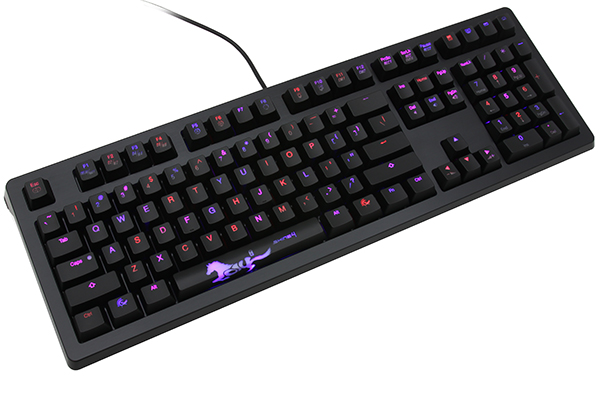
The Ducky Shine 4 is an excellent keyboard that gives you great build quality, a good typing experience and easy customization. Unfortunately, the ease of that customization comes at a cost. The Shine 4 can't handle macros right out of the box, or other advanced programmability. If you don't much care for macros and want a gaming keyboard that works well for typing and general gaming, then the Shine 4 is a good option. Just don't expect the advanced functionality you'd get with customization software.

One of the Shine 4's strengths is how many switch types you have to choose from. You can get Cherry MX Black, Brown, Blue, Green, Red and Clear switches. It's difficult to find a keyboard that comes with so many switch types. It can be especially hard to find keyboards with Green and Clear switches. The Shine 4 gives mechanical keyboard enthusiasts more switch options than any other keyboard on our lineup.

Sunday, 25 December 2016

Virtual Reality

Top 10 VR (Virtual Reality) Headsets 2016

What is VR (Virtual Reality)?
Virtual reality (VR) typically refers to computer technologies that use software to generate realistic images, sounds and other sensations that replicate a real environment (or create an imaginary setting), and simulate a user's physical presence in this environment, by enabling the user to interact with this space and any objects depicted therein using specialized display screens or projectors and other devices. VR has been defined as "...a realistic and immersive simulation of a three-dimensional environment, created using interactive software and hardware, and experienced or controlled by movement of the body" or as an "immersive, interactive experience generated by a computer".A person using virtual reality equipment is typically able to "look around" the artificial world, move about in it and interact with features or items that are depicted on a screen or in goggles. Virtual realities artificially create sensory experiences, which can include sight, touch, hearing, and, less commonly, smell. Most 2016-era virtual realities are displayed either on a computer monitor, a projector screen, or with a virtual reality headset (also called head-mounted display or HMD). HMDs typically take the form of head-mounted goggles with a screen in front of the eyes. Some simulations include additional sensory information and provide sounds through speakers or headphones. Virtual Reality actually brings the user into the digital world by cutting off outside stimuli. In this way user is solely focusing on the digital content.
Virtual reality environment can be captured using 360° stereoscopic spherical video and 360x360 surround sound from professional VR video cameras. The users can emerge in the virtual reality environment using head-mounted displays.

Here is the list of top 10 VR (Virtual Reality) Headsets in 2016:

1. HTC Vive
Price: $699.00(Amazon.com)


The HTC Vive is the most expensive and most advanced virtual reality headset on the market right now. It's also the best. It grants you the ability to get up and move about in a 15 x 15-foot space where you can jump, duck, lean and walk to interact within virtual worlds. It's an incredibly immersive and almost indescribable experience.
It has two wireless controllers that track your movement and let you move your hands in virtual space and interact with objects. The controllers not only can act as your hands but as a tennis racket, gun, shield, bow and arrow – it really all depends on what game you are playing.
The headset weighs your face down and looks and feels like an oversized diver's mask. It isn't the most comfortable VR headset available and has three long cables that rest atop your head. Its resolution is impressive: 1080 x 1200 pixels per eye, but the Vive needs a powerful gaming PC to run. Setup for the Vive isn't extremely difficult, but it requires plenty of space, about an hour of your time, three outlets, and maybe an extension cord or two. Oh yeah, and a highly powered gaming PC.
There are around 50 games available for the HTC Vive. It comes with three games: The Gallery - Episode 1: Call of the Starseed, Tilt Brush and Zombie Training Simulator.

2. Oculus Rift
Price: $ 599.99(Amazon.com)


The Oculus Rift is probably the first product that comes to mind when you think of virtual reality. Like the HTC Vive, it too requires a gaming PC. However, the Rift's experience isn't as immersive as the Vive. Rather than using two wireless controllers, the Oculus Rift includes an Xbox One controller and only has one sensor compared to the Vive's two, meaning you can't walk around. Facebook, which owns Oculus, says touch controllers for the Rift will come out later this year, however. You can still move your head around and lean back and forth in your chair, but movement definitely feels limited with this headset.
The headset is much more comfortable than the Vive, weighing 17 ounces compared to the Vive's 20 ounces. It's quite adjustable, too, with two Velcro straps on its side and lenses that can be calibrated so you get the best view.
The Oculus Rift launched with 30 games available, and the headset is expected to have more than 100 games out by the end of 2016. The headset comes bundled with two games: Lucky's Tale and Eve: Valkyrie.

3. PlayStation VR
Price: $ 623.97(Amazon.com)


Both Microsoft and Sony are in the race to take over the console VR market. Microsoft has announced Project Scorpio, an upgraded version of the Xbox One, which plays 4K-resolution games and supports virtual reality. Sony's upcoming 4K PlayStation 4, codenamed NEO, also is designed to help customers experience virtual reality games.
Sony has been demoing its PlayStation VR headset at tradeshows and in select retailers. The headset will be released in October of this year. It isn't as powerful as the Vive or Rift and has a lower resolution – 960 x 1080 pixels compared to 1080 x 1200. Its field of view is also slightly lower at just 100 degrees instead of 110 degrees. But the headset comes in at a much lower price of $400. That's half the price of the HTC Vive and $200 less than the Oculus Rift.
PSVR doesn't support room-scale VR like the HTC Vive does, similar to the Oculus Rift, and is designed to be a seated experience. Fortunately, it supports Sony's PlayStation Move and PlayStation Aim controllers. The Move controllers are a lot like the two wands that come bundled with the HTC Vive since they track your hands, and the Aim controller is designed for shooters.

4. Razer OSVR
Price:$ 399.99(razerzone.com)


Razer's foray into virtual reality seems quite promising after the company's introduction of the Open Source Virtual Reality (OSVR) headset. This virtual reality headset has dual OLED screens with a 1080 x 1200 resolution and a 110-degree field of view, bringing it to the same caliber as more expensive headsets like the Oculus Rift and HTC Vive. The OSVR even has a higher, 90Hz, refresh rate than these competitors.
The OSVR doesn't have as strong of tracking as the HTC Vive since it only uses one camera, similar to the Oculus Rift, instead of dual sensors like the Vive. Another downfall is it doesn't come with a controller. When we tested the OSVR we just paired the headset with an Xbox One controller. However, the OSVR headset is compatible with the Gloveone, which lets you use both hands to sense and interact with objects in virtual reality.
On the other hand, there are much cheaper headsets made from cardboard, plastic or aluminum. The most popular of these is Google Cardboard, which sells for around $10 online. Cardboard and other headsets like the Homido VR and Zeiss VR ONE have plastic magnifying lenses and rely on your Android or iPhone's screen. The best mid-grade virtual reality headset is the Samsung Gear VR, which is the result of a collaboration between Samsung and Oculus.

5. Gear VR
Price: $ 62.77(Amazon.com)


Since virtual reality is such a new technology, it's still pretty inaccessible thanks to its expensive price. Beyond the headset itself, the best virtual reality headsets need a gaming computer to operate. Enter Samsung's Gear VR. Samsung partnered with Oculus to create the headset, which only costs $99. It's compatible with the Galaxy S7, S7 edge, Note 5, Note 7, S6 and S6 edge smartphones.
The headset is comfortable, senses movement and has a touchpad that can be used to control apps and navigate menus. It's the best way to experience VR without investing in an expensive gaming PC or console.
The headset does suffer from overheating issues occasionally, especially when using it for long VR sessions.

6. Google Cardboard
Price:  $13.99(Amazon.com)


The most affordable VR headset is Google Cardboard, which sells for around $10 online. These headsets flooded the market and can even be acquired for free oftentimes at tech conferences or during email promotions. The headset is literally made of cardboard and has plastic magnifying lenses. It relies on your Android or iPhone's screen.
Google Cardboard is powered by your smartphone and apps on the App Store or Google Play. Don't expect any serious games or experiences with Cardboard though; it's an easy way to just get a little taste of virtual reality. Besides poor image quality, its biggest downfall is its lack of straps, so you have to actually hold up the device to your eyes with your hands.

7. Homido VR
Price:  $ 145.00(Amazon.com)


Homido VR lets you dabble in virtual reality for less than $100. However, this headset is just a glorified Google Cardboard headset and relies on your smartphone display. It's made from plastic and has a strong elastic strap and adjustable lenses.
It doesn't play nice with glasses and requires you to remove your smartphone from the headset each time you want to play a new game or watch a video. That is unless you have a Bluetooth controller, which will cost you extra.
Homido VR is 3D compatible, so you can watch your favorite 3D movies in a new and exciting way.

8. Zeiss VR ONE
Price:  $ 195.99(Amazon.com)

Zeiss is known for making outstanding camera lenses, and the German company has taken its expertise to enter the virtual reality market. Its Zeiss VR ONE headset is a step up from the Homido VR headset, but the experiences it provides still aren't the same caliber as the HTC Vive and Oculus Rift.
Zeiss has developed two apps for its headset: a cinema app for watching videos and an augmented reality app. We like that the headset has some padding and has a solid construction, but its field of view isn't impressive and the headset doesn't have any built-in navigation controls like the Gear VR does.
9. LG 360 VR
Price:  $ 114.00(Amazon.com)

You need an LG G5 smartphone to use this headset. The LG 360 VR connects to the phone via the USB-C cable. It is better than other headsets that require you to slip the phone to the front. The headset looks like a pair of sunglasses. It is wearable, meaning you don’t have to hold it in place with your hands. It has a 1.8-inch display with a resolution of 960 by 720 pixels. The resulting pixel density is 639ppi. The headset comes with controls- a ‘back’ and ‘ok’ button which aid navigation. It also has motion sensors that allow you to look around the virtual world created. It has a 3.5mm headphone plug for audio.
10. Google Daydream View
Price:  $ 130.99(Amazon.com)


Google Daydream takes you on incredible adventures in virtual reality. Made with lightweight fabric and inspired by wear, this headset is paired with a controller designed to be easy and intuitive. This headset can be used with day-dream ready phones built for virtual reality. Daydream-ready phones are built for VR with high-resolution displays, ultra-smooth graphics and high-fidelity sensors for precise head tracking and are powered by Android 7.0 Nougat. Pixel XL, Pixel, Moto Z, Moto Z Droid, Moto Z Force Droid – all support Google Daydream.

These are the best virtual reality headsets in the market. Creating a virtual world is wonderful. You can climb Mount Everest from the comfort of your home. Gaming in a virtual world is also very real with some of the VR headsets outlined above. So, which virtual reality headset do you want this Christmas? Let me know in the comments section below and wishing my all readers MERRY CHRISTMAS.